



Security
Protecting your Payments with Confirmation of Payee (CoP)

What is Confirmation of Payee?
Help protect your business from scams. Stay up to date with the current fraud alerts and advice from Scamwatch.

How it Works
We'll check if the account details you enter for a business payment, including account name, BSB, and account number, match the information held by the recipient's bank.
Based on the match outcome, you can:
- Proceed with confidence and complete the payment
- Pause to double-check the details with the intended recipient
- Decide not to proceed if something doesn't look right
Confirmation of Payee gives you extra certainty that your payments are going to the intended recipient, helping reduce errors and make payments safer.
How it Helps Protect my Money
How it Helps
Protect my Money

Another Protection Layer
Confirmation of Payee adds an extra verification check within Payment Guardian, strengthening the protection around your business payments.

Pay with Confidence
Verify your payee's bank details before processing your payment, so you have confidence that your money will go to the intended business.

Prevent Scams
Verify account details before sending money to reduce the risk of misdirected or scam payments.

It's Already On
Confirmation of Payee is built in, giving your payments an extra layer of security without any setup required.

Leading the way in payment security
Payment Logic is the first bill payment service provider to implement Confirmation of Payee. It's another example of our ongoing investment in payment security, helping give businesses greater confidence that their payments are going to the intended account.
What to Expect
We'll show you the match outcome and what it means for your payment. If a mismatch is detected, it's best to contact the business directly to confirm their bank account details.
Sending money to the wrong account may mean your funds can't be recovered, so checking the details helps keep your payments safe.

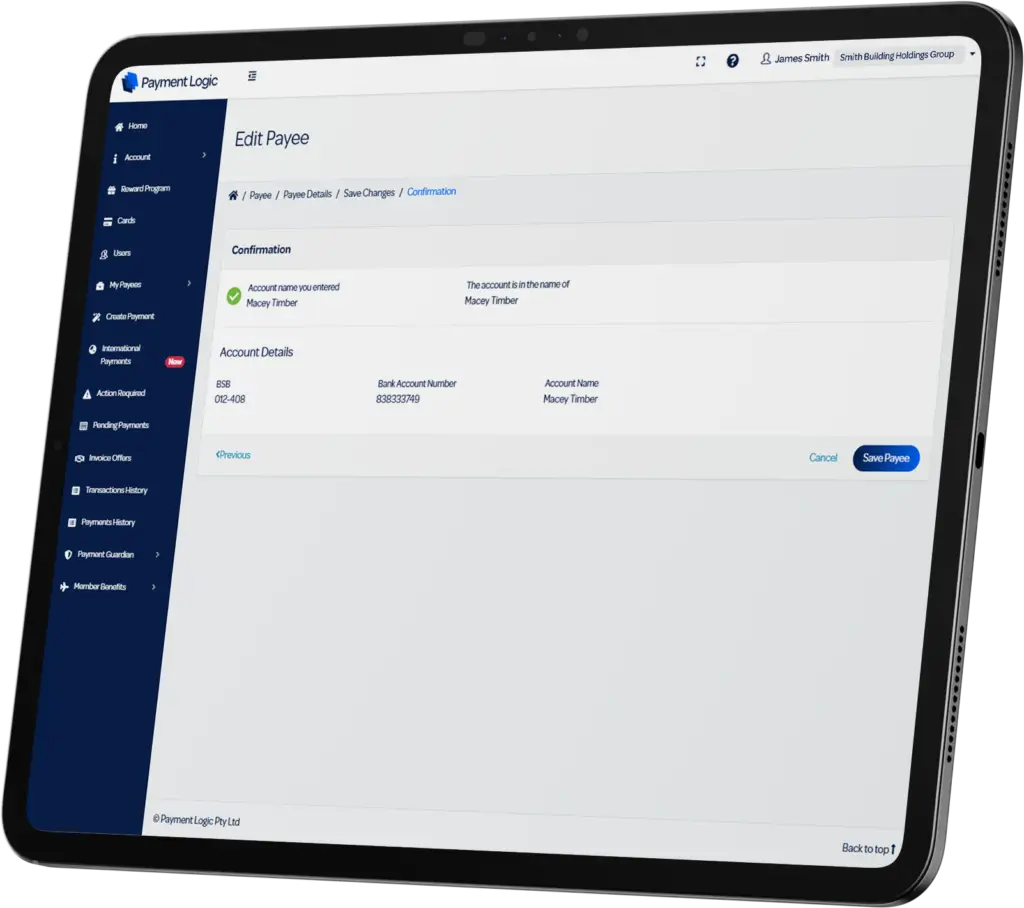
Everything checks out
The account details you've entered match the details held by the recipient's bank. You can proceed with confidence.

Worth a second look
The details you've entered are close to the recipient's bank records but aren't an exact match. Take a moment to double-check.

Details don't match
The details you've entered don't match the recipient's bank records. We recommend that you do not proceed with this payment.

Error
We're unable to verify the payee right now. Please contact the intended recipient to confirm the account details.
FAQs
How do I activate Confirmation of Payee?
You don’t need to do anything. Confirmation of Payee is already available in Payment Logic. When you add or edit a payee’s BSB and account number, you will be given the match result before you make a payment.
What do the match outcomes mean?
- ‘Account match’ means the details you’ve entered match the bank records of the intended recipient.
- ‘Close match’ means the details you’ve entered closely match the bank records of the intended recipient.
- ‘No match’ means that the details you entered do not match the bank records of the intended recipient.
- ‘Error’ means that the service couldn’t confirm the account details at this time.
- ‘This account is no longer active’ means that the account is closed.
- ‘No account found’ means that the account is not available.
Will I always see Confirmation of Payee results when adding Payees?
Yes, all Payees added are automatically checked.
What happens if I don’t use the correct name?
Your Payee’s bank details are automatically checked using the Confirmation of Payee service, and you will see a match outcome indicating whether or not the account details entered matches the account details held by the recipient’s bank.
Payment Logic recommends discussing any potential errors with your Payee before you initiate a payment.
What happens if I get a No Match result?
This means that the account name, BSB and/or account number you entered don’t match details held by the recipient’s bank.
Payment Logic recommends discussing any potential errors with your Payee before you initiate a payment.
Will people be able to see my name via the Confirmation of Payee service?
Your name as a Payment Logic customer is not disclosed as part of the Confirmation of Payee service. Only BSB, account number, and the account name are sent to the Confirmation of Payee service.
Your Payee will not know that our platform uses Confirmation of Payee to verify bank details.
Does Confirmation of Payee stop me from making a payment?
No, Confirmation of Payee helps you make informed decisions. Confirmation of Payee is triggered any time you add or edit account details for your Payee. You can decide based upon the match result if you want to continue.
We encourage you to be scam aware and always take steps to make sure you know who you are paying, as scams or mistaken payments may be difficult to retrieve. Payment Logic recommends discussing any potential errors with your Payee before you initiate a payment.
Please note: In the event a bank account you are trying to pay is closed, the system will not let you add those bank details.
Is Confirmation of Payee available for domestic and international payments?
Confirmation of Payee is currently only available for domestic (Australian) payments. It works on payments that use BSB and Account Number.
What if Confirmation of Payee isn’t working as expected?
You can contact our friendly customer service team on 1300 756 442 or via email at support@paymentlogic.com.au if you have any questions.